I’ve just spent the day migrating an aging email server to Office 365 for customer who was worried that all their chickens were in one basket, which of course they were. But I got stumped with the SRV records required for Office 365 as their provider, Vidahost, didn’t allow for the ‘service’ srv record.

Missing SRV records were holding up the Office 365 set up.
Here’s the solution I found after a bit of poking.
- Log in to the WHM cPanel portal and go to the advanced DNS editor.
- Create the new SRV records using the information from the screenshots below. The _sip ‘service’ field from Office365 becomes -sip._tls and goes in the Name field in WHM. The _sipfederationtls service field becomes _sipfederationtls._tcp and goes in the Name field. All other fields are as specified.
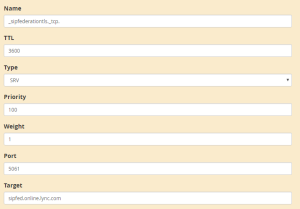
The _sipfederationtls record
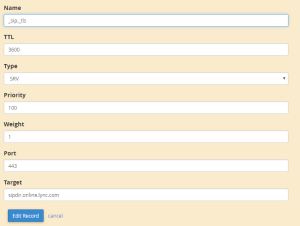
The _sip record
- A short wait and Office 365 should be happy. Yay.



What is your reaction?
Strongly Agree
0
Agree
0
Meh
0
Disagree
0
Strongly Disagree
0


